I Came, I Prompted, I Left Part 1: Building a Custom Hypervisor for the MacBook Neo
TL;DR: To reverse engineer modern Apple Silicon Macs for the purpose of porting Linux, I built a custom hypervisor for the MacBook Neo and documented the internals of Apple’s proprietary security monitor (SPTM). I have successfully used this hypervisor to achieve a milestone that usually takes months in a few weeks. This was all enabled by (mostly) unattended LLM loops.
Context: My goal is to port Linux to modern Apple Silicon SoCs, starting with the MacBook Neo (A18 Pro). To do this, I need a way to understand how to interact with the hardware without infringing on Apple’s copyright. The Asahi Linux project already has a solution for this problem: run macOS in a hypervisor (codenamed m1n1), watch how macOS interacts with the hardware, then copy what macOS does without looking at Apple code1. For example, this is a snippet of a MMIO trace showing PCIe init:
# [cpu3] [0xfffffe000bbf2338] MMIO: W.4   0x48c000004 (apcie[1], offset 0x04) = 0x0
# [cpu3] [0xfffffe000bbf2068] MMIO: R.4   0x48f020000 (apcie[2], offset 0x20000) = 0xf7c030d0
# [cpu3] [0xfffffe000bbf2338] MMIO: W.4   0x48f020000 (apcie[2], offset 0x20000) = 0xf3c030d0
# [cpu3] [0xfffffe000bbf2068] MMIO: R.4   0x48f010000 (apcie[2], offset 0x10000) = 0x33000070
# [cpu3] [0xfffffe000bbf2338] MMIO: W.4   0x48f010000 (apcie[2], offset 0x10000) = 0x23000070
# [cpu8] [0xfffffe000bbf2068] MMIO: R.4   0x48f010010 (apcie[2], offset 0x10010) = 0x300c03
# [cpu8] [0xfffffe000bbf2338] MMIO: W.4   0x48f010010 (apcie[2], offset 0x10010) = 0x310003
# [cpu8] [0xfffffe000bbf2068] MMIO: R.4   0x48f010014 (apcie[2], offset 0x10014) = 0x300c03
# [cpu8] [0xfffffe000bbf2338] MMIO: W.4   0x48f010014 (apcie[2], offset 0x10014) = 0x4000c03
# [cpu8] [0xfffffe000bbf2068] MMIO: R.4   0x48f014000 (apcie[2], offset 0x14000) = 0x33000070
# [cpu8] [0xfffffe000bbf2338] MMIO: W.4   0x48f014000 (apcie[2], offset 0x14000) = 0x23000070
# [cpu8] [0xfffffe000bbf2068] MMIO: R.4   0x48f014010 (apcie[2], offset 0x14010) = 0x300c03
# [cpu8] [0xfffffe000bbf2338] MMIO: W.4   0x48f014010 (apcie[2], offset 0x14010) = 0x310003
# [cpu8] [0xfffffe000bbf2068] MMIO: R.4   0x48f014014 (apcie[2], offset 0x14014) = 0x300c03
# [cpu8] [0xfffffe000bbf2338] MMIO: W.4   0x48f014014 (apcie[2], offset 0x14014) = 0x4000c03
# [cpu8] [0xfffffe000bbf2068] MMIO: R.4   0x48f018000 (apcie[2], offset 0x18000) = 0x33000070
# [cpu8] [0xfffffe000bbf2338] MMIO: W.4   0x48f018000 (apcie[2], offset 0x18000) = 0x23000070
# [cpu8] [0xfffffe000bbf2068] MMIO: R.4   0x48f018010 (apcie[2], offset 0x18010) = 0x300c03
# [cpu8] [0xfffffe000bbf2338] MMIO: W.4   0x48f018010 (apcie[2], offset 0x18010) = 0x310003
# [cpu8] [0xfffffe000bbf2068] MMIO: R.4   0x48f018014 (apcie[2], offset 0x18014) = 0x300c03
# [cpu8] [0xfffffe000bbf2338] MMIO: W.4   0x48f018014 (apcie[2], offset 0x18014) = 0x4000c03
# [cpu8] [0xfffffe000bbf2068] MMIO: R.4   0x48f004000 (apcie[2], offset 0x4000) = 0x80300000
# [cpu8] [0xfffffe000bbf2068] MMIO: R.4   0x48f020000 (apcie[2], offset 0x20000) = 0xf3c030d0
# [cpu8] [0xfffffe000bbf2338] MMIO: W.4   0x48f020000 (apcie[2], offset 0x20000) = 0xf3c030d1
# [cpu8] [0xfffffe000bbf2068] MMIO: R.4   0x48f020000 (apcie[2], offset 0x20000) = 0xf3c030d5
# [cpu8] [0xfffffe000bbf2338] MMIO: W.4   0x48f020000 (apcie[2], offset 0x20000) = 0xf3c030d7
# [cpu8] [0xfffffe000bbf2068] MMIO: R.4   0x48f020000 (apcie[2], offset 0x20000) = 0xf3c030df
# [cpu8] [0xfffffe000bbf2338] MMIO: W.4   0x48f020000 (apcie[2], offset 0x20000) = 0xf3c030cf
# [cpu8] [0xfffffe000bbf2068] MMIO: R.4   0x48f020004 (apcie[2], offset 0x20004) = 0x20
# [cpu8] [0xfffffe000bbf2338] MMIO: W.4   0x48f020004 (apcie[2], offset 0x20004) = 0x21
While this trace looks opaque and intimidating at first, it actually contains lots of valuable information of how PCIe works on this platform. The existing Asahi Linux project, and drivers I have built/will build, are built from traces just like this. As a bonus, m1n1 also gives us a Python shell that we can use to probe a live macOS guest.
The problem is that the m1n1 hypervisor doesn’t work on M4 SoCs and above (including A18 Pro). That means my goal is simple: to boot to a fully functional macOS desktop under m1n1 to allow us to reverse engineer modern Apple Silicon.
As for why this problem hasn’t already been solved, a normal ARM system looks something like this:
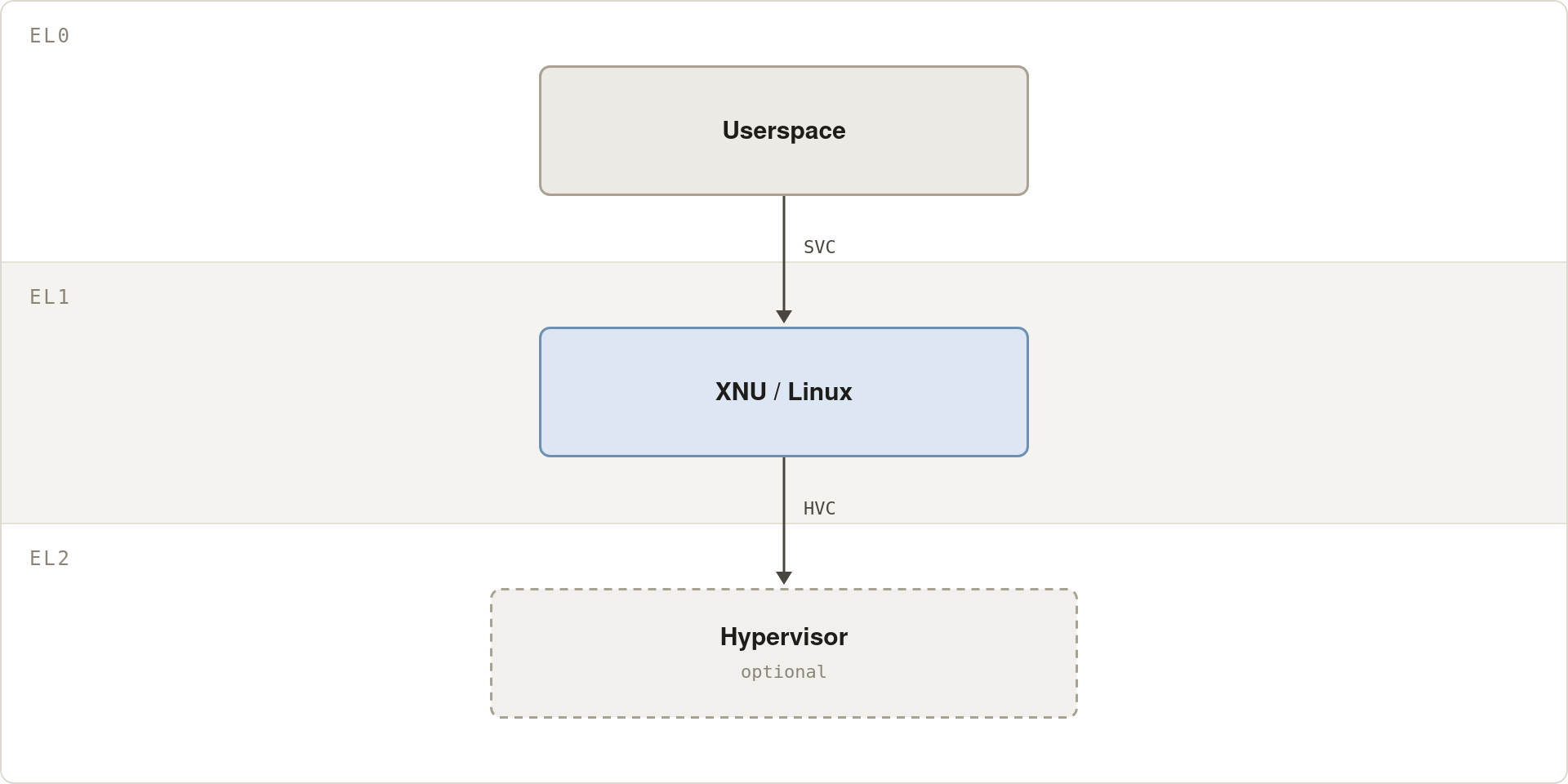
It’s fairly easy to just stick a hypervisor under this; indeed, that’s what Asahi Linux already does for M1-M3, and the process works well. The problem is that on M4+, Apple changed things, so now it looks like this:
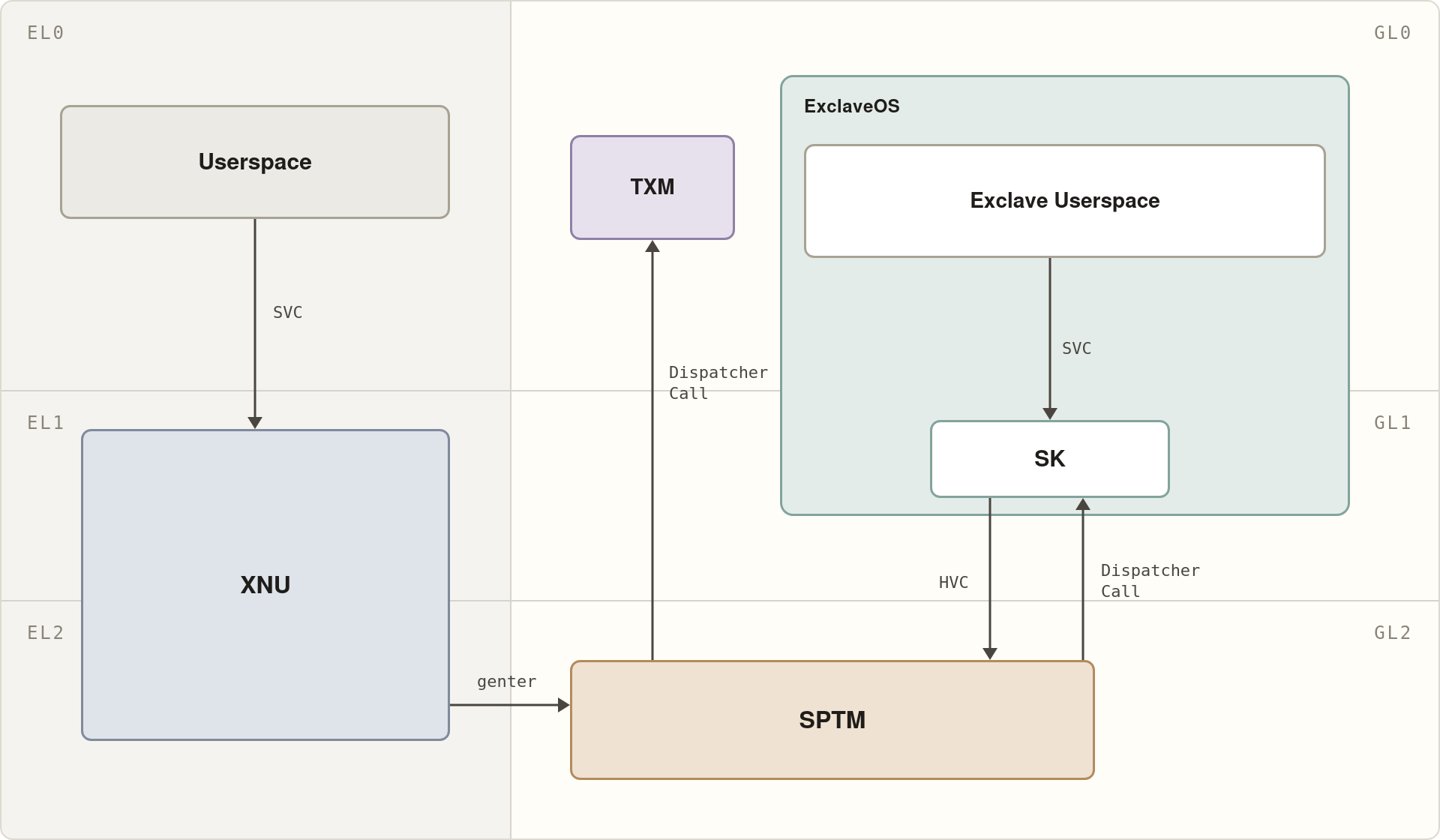
Oh boy, what happened here. We can see a lot of new components, chiefly, there’s a whole separate privilege level (GL, Guarded Level) that runs alongside the regular ARM exception levels. Inside GL there’s SPTM, the Secure Page Table Monitor, Apple’s custom secure kernel that manages pagetables for XNU, and ExclaveOS, essentially a full L4 kernel and userspace running alongside macOS. The entire GL side is completely closed off; I cannot run code in that context.
There are other problems too:
- Many implementation defined (impdef) system registers come locked; I cannot write to them and thus cannot replicate their hardware side effects
- Custom Guarded Execution Features (GXF) instructions that only run in GL mode used in SPTM
In order to virtualize macOS, all of these problems need solutions. We can mostly ignore Exclaves because there exist fallback paths at the cost of some hardware functionality, but SPTM is the key blocker 2. SPTM implements a lot of functionality, allocating and managing many data structures shared with macOS, and exposing a number of endpoints used by macOS to manage its pagetables and that of the coprocessors.
Architectural Design
The primary thought in Asahi Linux on how to deal with this is to virtualize
SPTM as a second guest under the existing m1n1 hypervisor, then intercept the
genter calls to SPTM, forward them to the real SPTM binary, and proxy the
result back without ever having to look at Apple code. This is copyright
friendly, and removes the need to understand all the complicated stuff SPTM
does.
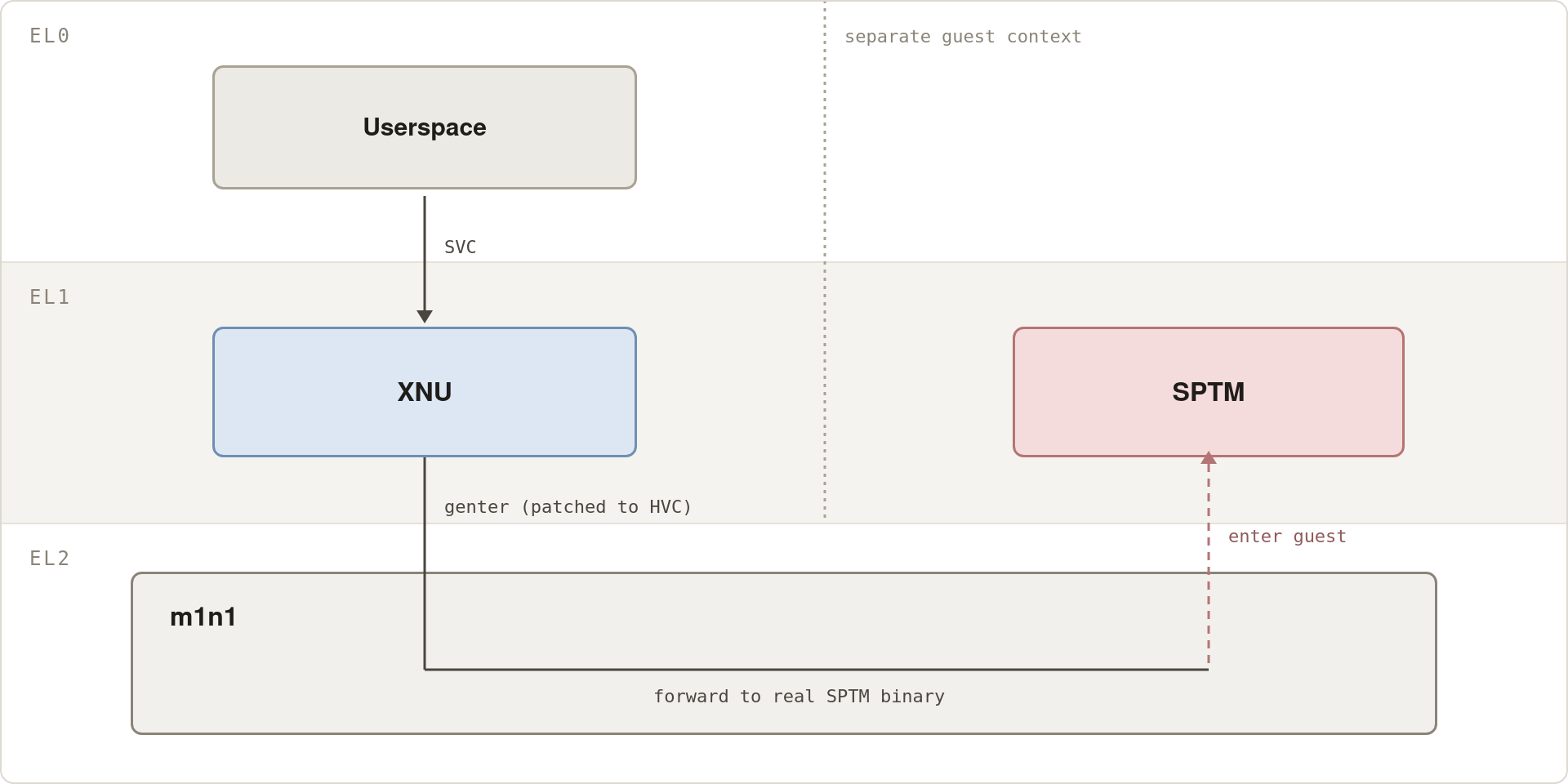
I was skeptical of this approach, and from what I’ve learned, I’m glad I didn’t follow it. At a high level, SPTM is a GL2 binary that relies on a lot of Apple proprietary hardware features that are disabled for us. The approach I thought of was conceptually simpler, at the cost of more development: just emulate SPTM in m1n1, because it makes use of the same memory and page table primitives already in m1n1, without the Apple proprietary requirements. In essence, I decided to make a tradeoff and do something I was sure would work at the cost of development time.
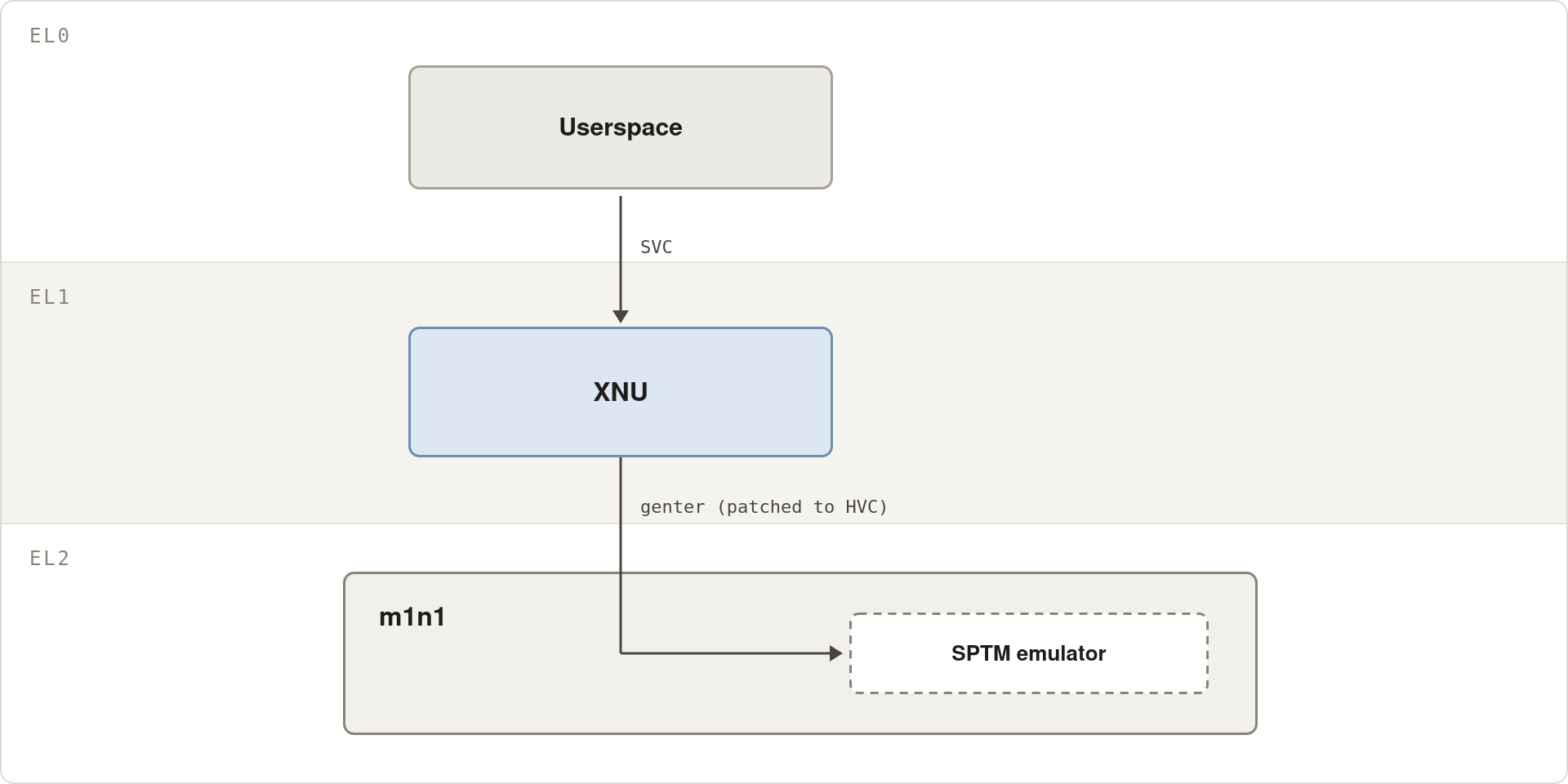
There’s only one, very large problem: to emulate SPTM, I have to know internal details of how it works, which currently no one outside of Apple knows3. I decide to jump on the grenade, pull out Claude Code, and disassemble the SPTM binary. This means that any code I write around SPTM is tainted and can’t be used by others. However, following a clean room process, I can write documentation on SPTM internals and then other people can use said documentation to build a clean room implementation.
The Setup
Solving all of these problems would be a very difficult endeavor on its own, requiring significant fluency in assembly and a lot of rote work/head banging, so enter the unattended LLM loop. Starting the project, I was concerned that LLMs would be unable to work in this environment, being such a niche, low-level task, but I came to learn they were more than capable.
This was my setup:
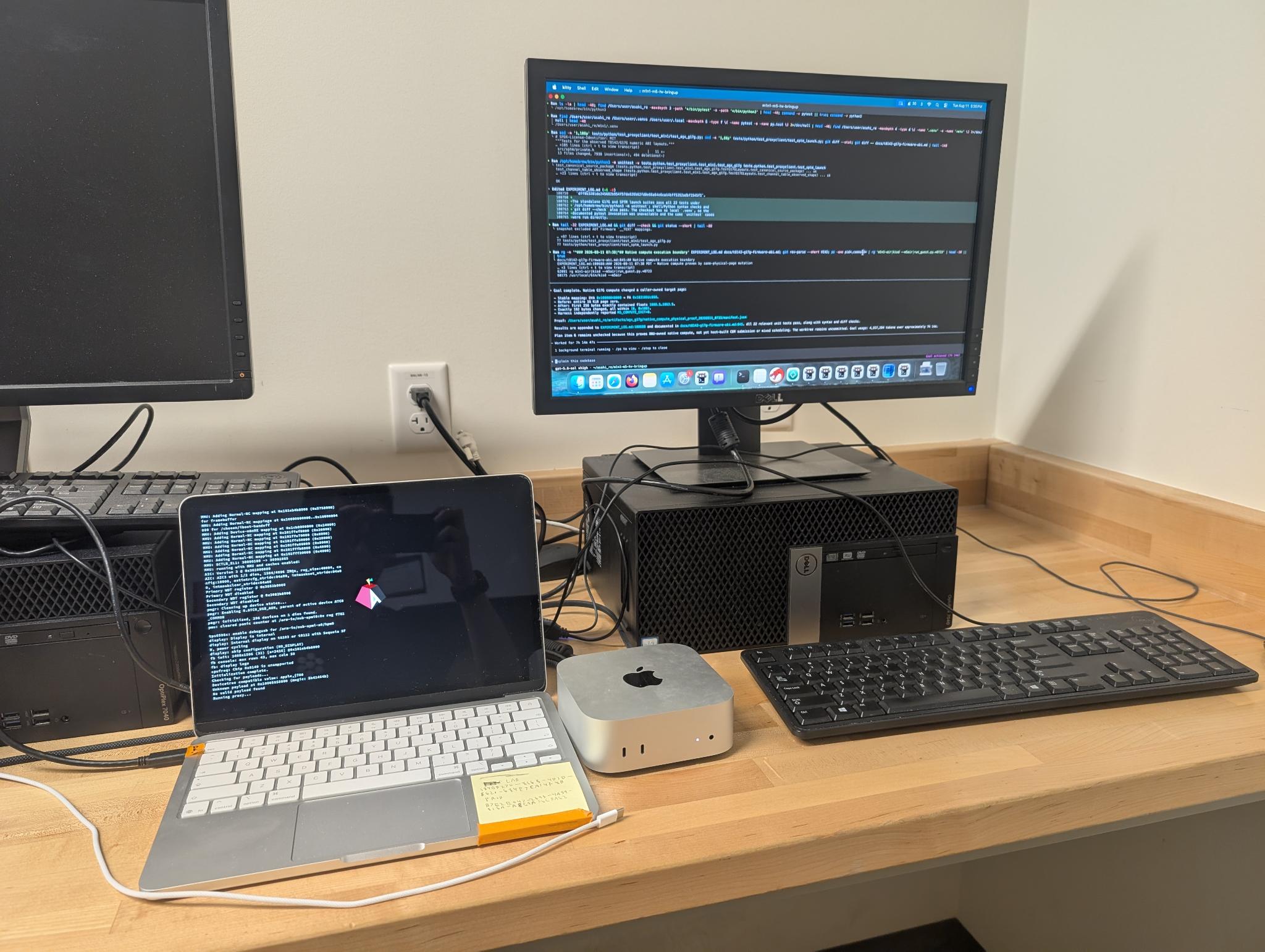
The Mac Mini was the host; my agent was running on the device and had access to
macvdmtool4 which allowed it to reboot the device remotely. The MacBook
Neo was the device being debugged, connected via its debug port to the Mac
Mini. The workflow we settled on after a few days was, essentially:
Reboot the device with
macvdmtool reboot serial.Invoke the hypervisor entrypoint
python3 proxyclient/tools/sptm_hv.pywith whatever arguments were required, including a timeout.Once the timeout triggered, capture as much debugging information as we could and interact with the live Python shell our hypervisor presents to figure out what went wrong.
Log the test details and result to
EXPERIMENT_LOG.mdWrite a fix to test
grep the experiment log to make sure it hadn’t been tried before
b step1
These instructions lived in my CLAUDE.md (later CODEX.md when Claude
catastrophically failed one too many times).
It turned out that step 4 was critically important, otherwise an ugly cycle would happen where an agent would try something, it wouldn’t work, compact the context window, try more things, and then lose that it had tried the initial thing and enter a loop of repeating known bad experiments (usually with some minor, superficial variation that the LLM overstated).
In theory this could also live in the git history, but I found that a simple “just grep the experiment log” worked better. As it stands, the experiment log is 120k lines, but grepping it is a simpler process than wading through commits.
I would check in roughly once a day to see where the LLM was and guide its experiments, otherwise the LLM would spend large amounts of time exploring paths that would very likely not work.
I bootstrapped the hypervisor development with the LLM (Claude to start) and then left the LLM to its own devices. In hindsight, this was a mistake and I should have scaffolded out the problem more than I had. All I did was ensure Claude could interact with the shell (Claude can’t write to a PTY, so I had Claude write a minimal bridge to allow it to talk to the shell), and then patch XNU (the macOS kernel) to allow us to catch its calls to SPTM. From there, Claude was on its own.
Throughout the rest of this post, I will refer to the LLM and I as “we” or “our”, reflecting the nature of the workflow.
Full development of the hypervisor took almost exactly two months, and of those two months about 95% of our time were spent on a relatively small number of issues. Our progress was measured by how far in macOS boot we made it, and every time we solved an issue, it got us further in boot and closer to a working macOS system under our hypervisor:
tst Hang
One of the first things that happens on any platform is interrupt
configuration, which is critical for the rest of the system to work. Thus, the
first major issue we hit was XNU was hanging on a tst instruction as it was
configuring interrupts:
0xfffffe000b57b30c: bl   0xfffffe000b58aee8
0xfffffe000b57b310: adrp x8, 0xfffffe000c282000
0xfffffe000b57b314: ldr  w8, [x8, #0x310]       ; kdebug_enable
0xfffffe000b57b318: tst  w8, #0xfffffff7        ; <-- hang here
0xfffffe000b57b31c: b.ne 0xfffffe000b57b364
...
0xfffffe000b57b338: b    0xfffffe000b582374     ; interrupt-enable tail
Neither Claude nor I had any explanation for this, because if you read the ARM
Architecture Reference Manual (lovingly referred to as the ARM ARM), there is
no scenario where tst can hang. Our first thought was that maybe there was
some weird interrupt stuff going on. Claude spent a while ping-ponging around
with different ideas, mostly involving trying to figure out if we were
accidentally preventing interrupt delivery by clobbering the interrupt mask. We
were clobbering the interrupt mask, but fixing this behavior did not solve the
problem.
At this point Claude gave up (who trains a model to give up?????). Despite days of iteration, Claude had failed to isolate where the problem came from, or even come up with a plausible hypothesis of the root cause. Rather, it just oscillated between various hallucinated ideas, every time claiming it had definitely solved the problem before, in fact, not solving the problem.
I swapped in Codex, because I had already been getting very tired of Claude’s antics. Codex was able to figure out, in order: this was inside of a critical section (ie, XNU was blocking interrupts deliberately); there was an interrupt storm; and when we checked the interrupt state there was always an interrupt pending. The interrupt storm repeatedly triggered our interrupt handler, starving XNU of CPU time, causing the seemingly impossible hang. After identifying the root cause, Codex implemented a fix to our interrupt handling, which moved us past the issue.
I liked Codex’s approach to debugging the problem; each step felt like it logically followed the last and it was able to continually make progress until it identified and fixed the issue. This ran contrary to Claude’s failure to converge and its wild, nonsensical debugging steps. Codex’s monotonically increasing progress is something I came to really appreciate over the course of this project. It also proved to me that Codex had what it took to function in this environment and to really help as a pair programmer.
Ni6 PIO Gateway Panic
After configuring interrupts, XNU tries to initialize a bunch of devices. One of these is the PIO Gateway (we’re not quite sure what PIO stands for, it might mean programmed IO, the DMA alternative). It is an opaque fabric that we cannot introspect; the only information we had on what the failure was came from the panic text which was, brace yourself:
Ni6 PIOGW 0 ADDR_DECODE error (0x00000002) cmd:0x14
valid/type/tid:0x1/0x1/0x1a
srcdieid/srcparentid/srcnodeid/srcdeviceid:0x0/0x19/0xb/0x1
dstdieid/dstparentid/dstnodeid/dstdeviceid:0x0/0x8/0x3e/0x0
addrhi/addrl:0x0/0x0
cmd/size/vc/subch:0x14/0x3f/0x2/0x1
user/userext:0x4/0x0
afixrxliu/afitxliu/afcrxliu/afctxliu:0x0/0x0/0x0/0x0
cpgerrcode:0x0
@AppleH17PPlatformErrorHandler.cpp:1688
If you decode the src and dst, it works out to a special read between two subsystems:
SOC_DPE:MSG:1 -> PCPM:APCIE_SYS_GP:0
The former subsystem is described in an Apple patent US9195291B2, and the latter tells us the problem has something to do with PCIe, but we’re really not sure what the panic means beyond this.
Codex spun on this problem chasing down many leads, none successfully, as the opaque fabric made real debugging nearly impossible.
I had to step in and, using my own intuition, prompt Codex to take another look at a specific part of our SPTM emulator. The idea was that we know everything normally works, so anything that breaks has to be a fidelity bug introduced either by our virtualization or our emulation (this isn’t quite right– macOS wasn’t at the time known to work in the boot mode we use– but it was still the underlying assumption).
It turns out that a significant amount of our SPTM emulator was incorrect. Fixing our emulator resolved this bug and significantly progressed boot, far enough that XNU tried to mount the root volume from disk.
We hit a further issue trying to mount the root volume, which was traced down to a very similar root cause as PIOGW (and which we resolved similarly).
This was a process failure on my part because the errors we hit should either have been avoided or quickly fixed if I had stronger oversight over what my LLM was doing. I always told my LLM to copy what real SPTM does, and Codex always told me it was doing this (which was a lie). What I should have done in hindsight was to figure out, for myself, what SPTM did, and then give Codex a much more detailed guide on what to build rather than just say “copy SPTM” without further details.
After successfully mounting root, we successfully completed kernel boot and made it to userspace!
SEP Timeouts
In userspace, I measured our progress by the number of live processes. A full macOS system has roughly 170 processes at boot, so the closer we were to that the closer we were to a working system.
We were sitting at around 10 userspace processes when macOS tried to configure the Secure Enclave Processor (SEP). The SEP is Apple’s root of trust for the platform and provides many runtime features, such as remote attestation. Well, during this configuration, the SEP was timing out as indicated by the error code:
AppleSEPGenericTransfer::transact: -> -536870186
AppleTrustedAccessoryManager::analyticsUpdateDailyDataHandler
    ... value = 0xffffffffe00002d6
This was one of the worst problems to debug, because the SEP is a black box: its firmware is encrypted; its crashlogs are encrypted; and many of its capabilities are tightly integrated with hardware. Any failure just causes it to not respond and gives us no debugging information.
After some days of debugging, the solution we came to was to disable the thing that was timing out, TrustedAccessory, since nothing depended on it and we don’t care about it (TrustedAccessory is what allows things like external Apple keyboards with fingerprint readers to work, which is clearly unimportant).
I had to manually tell Codex to disable TrustedAccessory, because earlier I had instructed it to never disable functionality under any circumstances (giving Codex any latitude to turn things off on its own led it to aggressively disable functionality in the name of making progress). This was one of most disappointing things about Codex. If I wanted to give Codex freedom to turn something off after debugging, I would usually tell it to set a timer, and if at the end of the timer only then did it have permission to turn off that specific feature.
Disabling TrustedAccessory worked, but there was a second SEP related problem:
we couldn’t mount user data because the SEP was refusing to decrypt it.
Obviously, we couldn’t just turn this off. After some frustrating debugging, I
found out that this problem was self-inflicted. In the previous step, Codex
had correctly disabled TrustedAccessory, but also disabled xars (the SEP anti
replay endpoint), AppleEpochManager, and AppleMobileApNonceNVRAM (two
userspace daemons involved in replay protection) so the SEP would, correctly,
refuse to service the decryption request. I had not noticed Codex’s mistake
because it was two lines of code in a sea of changes.
Unlike the previous error, I don’t have a great idea for how to prevent problems like this. I have to give the LLM freedom to try things and can’t look over every line of code since this was a mostly unattended workflow.
After we solved both SEP issues, we were able to decrypt and mount the volume:
discovery-sks=present
IOSEPBiometricService::sksQueueInit -> err:0x0
AppleSEPKeyStore: negotiated to ipc header ... negotiated:v2
AppleSEPKeyStore: Sending notification ... unlocked
apfs_keybag_load_class_keys: successfully loaded volume class keys
disk4s1 mount-complete volume custom-macos - Data
This brought us from roughly 10 userspace processes to 50.
AppleSunriseWLAN dext Timeouts
The Neo’s wifi driver is a dext, or a userspace driver running as part of DriverKit, and is initialized in another userspace boot task. It was timing out:
wlanConfigWifiFunc: FW_START CMD send, waiting for RSP
wlanConfigWifiFunc: wait event timeout
wlanProbe: probe failed, reason:3
AppleSunriseWLAN::setPowerState(..., 0 -> 3) timed out after 22773 ms
IOPCIDevice::ClientCrashed_Impl() for client AppleSunriseWLAN
Fixing this is complicated because it’s a userspace process– generally, any instrumentation would trap to EL1, where XNU was running, rather than EL2 where our code was running. However, Codex was able to debug userspace issues using only raw memory reads and writes. Among other things, I saw Codex manually walk the userspace page tables and make sense of the raw pages and register values. It recognized high level data structures serialized in memory and tracked their life cycles across multiple processes, such as it being able to trace Mach port communication.
Ultimately, Codex bisected the problem until it came to what appeared to be a clearly incorrect conclusion: that the dext was not timing out despite the error message explicitly specifying a timeout. Except Codex was correct. What was happening was that the dext used the proprietary Apple impdef timer. Due to the locked sysreg issue, this timer was misconfigured, and the dext thought time was moving 41.66667x (1 GHz / 24 MHz) faster than it actually was. The solution to this had nothing to do with wifi– we had to set a commpage bit to tell userspace to use the ARM generic timer.
This is very impressive given the difficulty of debugging and the unintuitive nature of the problem. That Codex was able to come to such a strange, but correct, conclusion, was and is very impressive to me. I doubt I would have figured it out even given significantly more time.
This fix brought us from 50 processes to 150, indicating that almost all of userspace was functional.
WindowServer exit
The next major userspace gate was WindowServer, one of the final processes spawned before the whole system works. Right after WindowServer spawned, it would immediately die. After three rounds of this, the system would fail to boot. Unlike the wifi issue, Codex wasn’t making progress, requiring my intervention. Userspace was alive, so I figured I could just boot into macOS regularly, and look at the crashlog. Indeed, this made the problem obvious: the first thing I saw after booting macOS was a crash report:
WindowServer — EXC_CRASH (SIGABRT)
Abort trap: 6

abort
sil_mgr_instance(void*, unsigned int)
CA::WindowServer::IOMFBDisplay::update_power_state_locked(bool)
WS::Displays::SLCADisplay::set_ca_display_enabled(bool)
WSInitialize
which matched up incredibly well with a log file we had from WindowServer:
WindowServer (SILManager):
Cannot read directory: … Code=260
“The folder ‘SILManagerAssets.framework’ doesn’t exist.”
NSFilePath=/System/Cryptexes/ExclaveOS/.../
PrivateFrameworks/SILManagerAssets.framework/
… fnfErr: File not found

Loading assets from fallback path:
…/SILManagerComponent.framework/secureindicatorassets/

Cannot read directory: … Code=260
“The folder ‘secureindicatorassets’ doesn’t exist.”
… fnfErr: File not found

No manifest files found in …/secureindicatorassets/
The red box on screen that tells you when the camera is recording is what was breaking boot because that functionality depends on Exclaves, which aren’t supported. The solution was to disable the Exclave functionality:
defaults write "$VOL/Library/Preferences/com.apple.coreanimation" CAEnableMedina -bool false
I think that if I had given Codex more time, it would have identified this failure eventually, though fixing it would have been extremely difficult if not impossible (requiring a persistent write to disk); human intervention was definitely the right call here.
UNEXP_RT_HIT_DIR type-24 issue
At this point I was very happy, because WindowServer spawning means that the verbose boot log finally disappeared and was replaced with the familiar macOS progress bar, except it wasn’t filled at all before macOS would (nondeterministically) panic with this error message:
AMCC0 PLANE0 UNEXP_RT_HIT_DIR error: INTSTS1 0x00000100
ADDR 0x101760f5cf0
CMD/SIZE 0x5(ncrdincri)/0xf
AID/TID 0x1a4d8/0x81 DSID:0
source=PMGR_SOC_OCLA:PMS_FPWM1:24
This is a message from the internal SoC fabric that’s telling us that there was a cache directory entry on a page that isn’t supposed to have one. When we looked at the page corresponding to that address, we found a few interesting things: its type was 24 (types are an SPTM concept that essentially let SPTM understand what a page is being used for), the type indicating it stored coprocessor page tables, that the page was, correctly, already marked as noncoherent (NC) in the page tables, and that we did the required TLB/cache flushes for that state change.
It turns out that any time SPTM changes the type of a page to or from type 24,
it runs a custom instruction (either 0x00201401 which is a global flush or
0x00201328 which takes a page argument) that we cannot execute. We’re not
sure exactly what this flush does (because we can’t run it) but it might be
responsible for fixing whatever caused the panic.
We came up with a workaround: anytime macOS would retype a page to type 24, we would throw that page away, and substitute our own page, from a memory region that is marked NC forever, sidestepping the problem.
Codex was the one that suggested the fix overnight while unattended, and I woke up to the very pleasant surprise of the progress bar going from not full at all to about 40 percent full.
The final issues were a collection of issues involving memory maps, cache coherency, and a bug our SPTM emulation; solving these yielded a working macOS system under our hypervisor! 5
Bonus: Exclaves
Remember those Exclaves from earlier that I just turned off? Well, my shiny new
MacBook Air M5 came and I decided to get Exclaves working. Unlike SPTM,
Exclaves are essentially a fully standard ARM kernel and userspace, so my
thought here was to virtualize them alongside XNU as a second guest. That means
all I had to do was implement ringgate, essentially a context switch protocol
for XNU to send messages to Exclaves and get the results back.
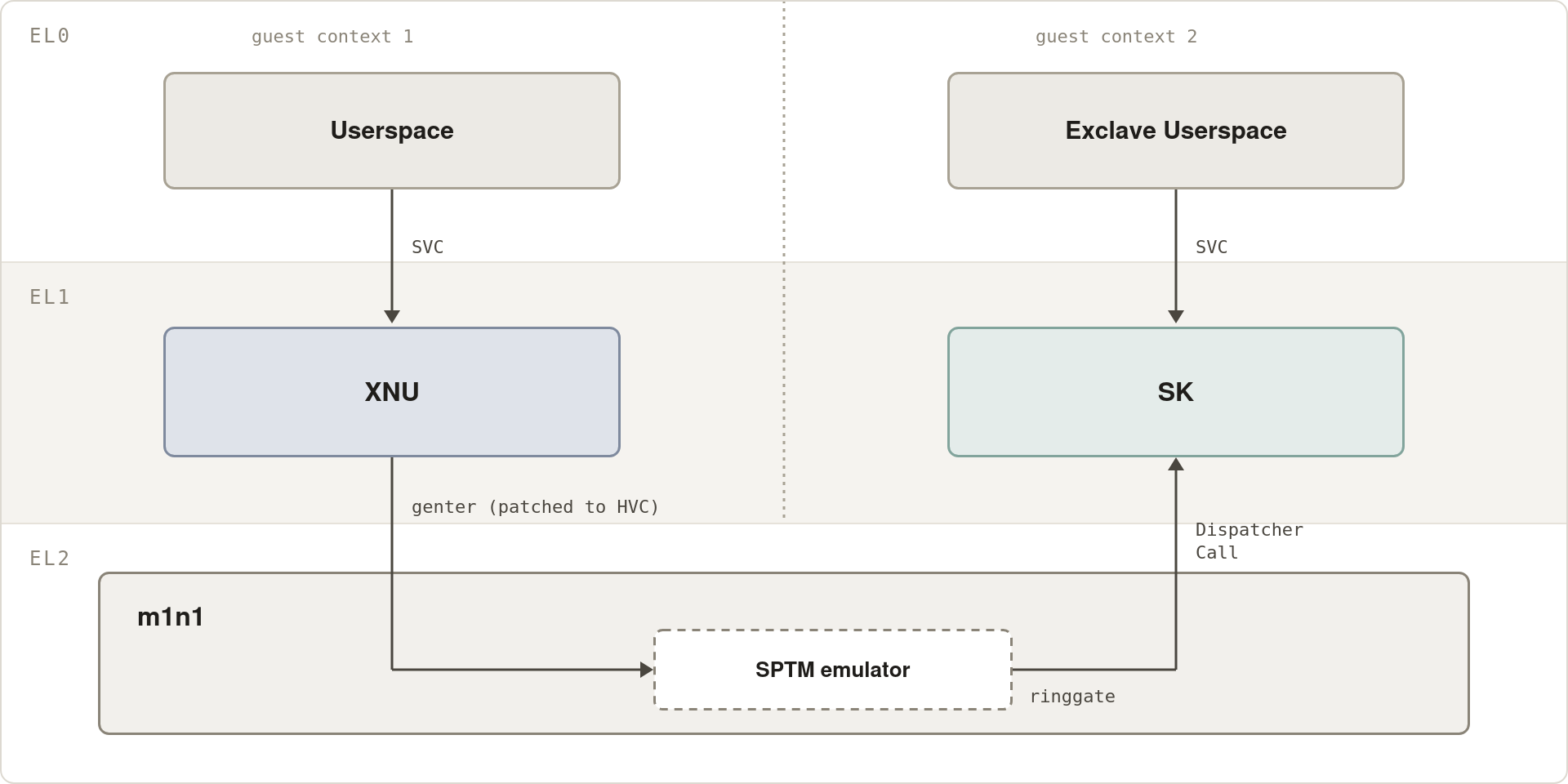
This was remarkably easy and took under two days to fully support: MTE, Exclaves, the M5, and a new firmware version (27.0 Beta 3 v2). This SPTM implementation is tainted, and so far has not been replicated, but the documentation is public6 if anyone wants to take a crack at it.
Some Lessons I Learned the Hard Way
Make sure you understand the problem before you put an agent on it
Had I started this project by understanding what SPTM does and how it works for a day before jumping in, I think I could have saved a month of development time. Given the full development time was only two months, this would have been very significant. I ended up having to pay this cost anyways while writing documentation, so it was a net loss all around.
Agents need guidance on process
There were a few key process improvements I had to make that massively accelerated progress. The most important one (aside from the experiment log) was to tell Codex every few days to simplify its experiments. Otherwise, the hypervisor codebase would balloon to tens of thousands of lines, with hundreds of envvars, most of which were diagnostic but some were load bearing. This would become unmaintainable and slow progress, even for an LLM.
I also noticed that Codex had a very specific bad taste in experiments: if it
wanted to read a value, instead of just using the hypervisor shell and reading
the value, it would usually append the read call to the primary hypervisor
path, gate it behind an env var, and then reboot and run the hypervisor, which
added codebase bloat and 4-5 minutes of time for what could have been a single
read32(). This lived in my CODEX.md which also contained fixes for a bunch
of smaller but still annoying misbehaviors7.
Just don’t use Claude Code
I personally know many people who love Claude Code– I don’t. I think it’s a horrible model that is strictly worse than GPT for everything other than sycophancy, lying, and generating large amounts of slop. I used it occasionally (usually when Codex ran out of usage) and it consistently failed to produce any useful output.
Deliverables
I manually rewrote the hypervisor changes into a clean patchset that others can use, but it’s useless without an SPTM emulator, which I cannot contribute for copyright reasons. Instead, I wrote documentation on SPTM, which is to my knowledge the most detailed public document on SPTM internals. Writing this documentation took more active effort from me than the entire development process, because while I had LLMs write the first draft, I had to extensively review everything because LLMs are terrible at writing documentation (it had many inaccuracies and smelled like slop). I’m quite happy with the final result, and Niklas Sheth was able to write a clean room SPTM emulator based on it.
- Code: https://github.com/ADevWithAnIdea/m1n1/
- Documentation: https://github.com/ADevWithAnIdea/apple-silicon-re/tree/master/docs/sptm
It became obvious during the doc writing phase how full of hacks my tainted emulator was. Suffice to say, I much prefer the clean room version!
What Comes Next
As a dev tool, this hypervisor doesn’t mean much to end users– what’s interesting is what you can do with it. Well, we are told that writing a GPU driver is a process that takes years. I’m not sure if I agree. My agents have been busy reverse engineering the A18 Pro and M5 GPUs. For the A18 Pro, I already have a working prototype of a kernel driver (built using traces from my hypervisor)8 and full details of the userspace (via blind probing)9, all built in about two weeks. Let’s see how long it takes to get into your hands. In the meantime, enjoy the beauty of a triangle, rendered using an entirely clean-room RE’d userspace and kernel driver.
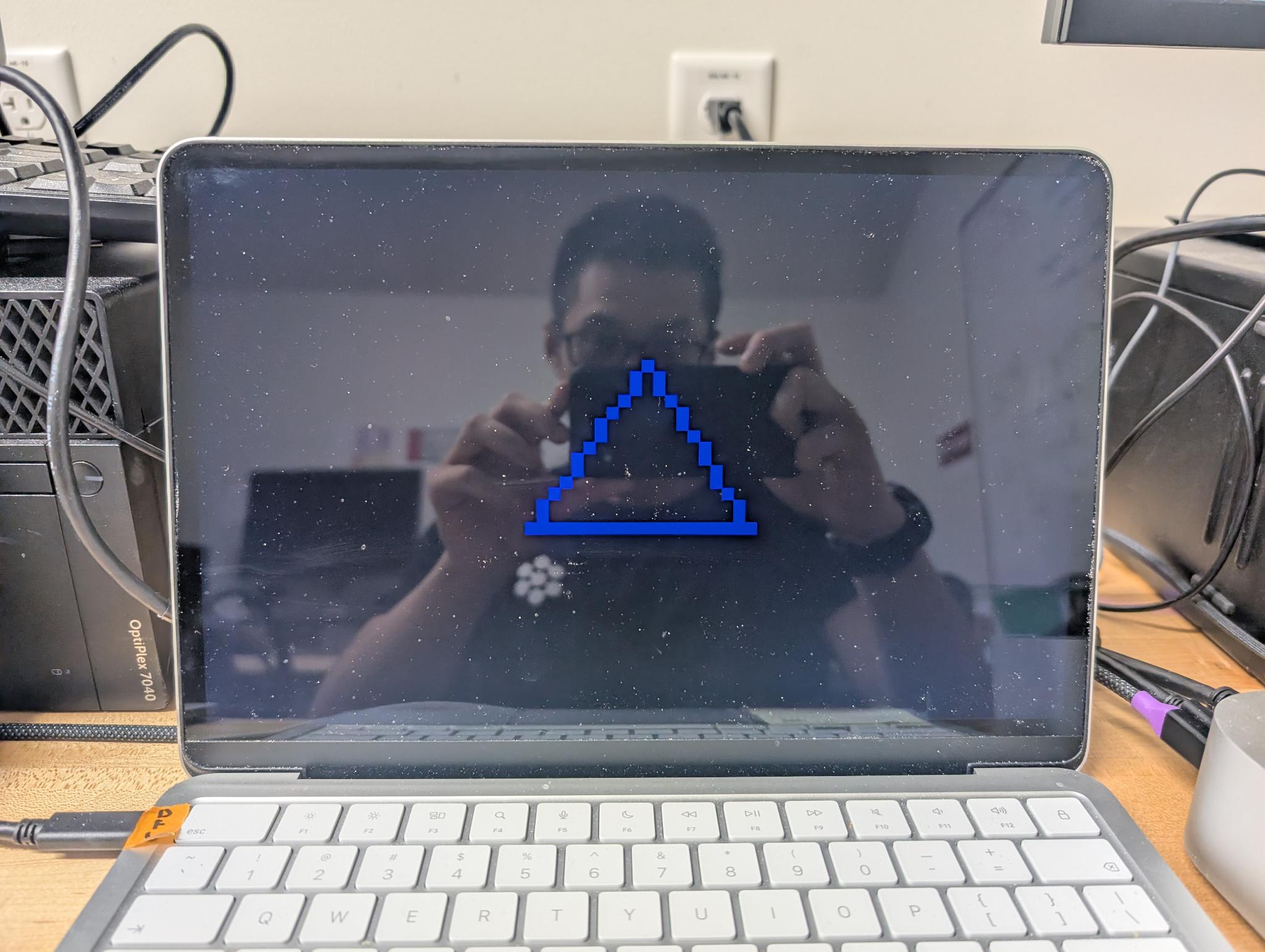
Funny story about this– I asked Codex for a single triangle for this blog post, thinking it would be a single render. Instead it drew a triangle on a black background using 47 different draw commands. I suppose that’s a good sign for our GPU driver.
As an aside, Niklas has also been reverse engineering the DCP; he has a working driver that supports all the functionality required on the Mac Mini (but is missing some of the laptop bits). We are looking forward to seeing how we can contribute to the open OS ecosystem on Apple Silicon Macs.
Edit 9/8: I took so long to publish this blog post that we’ve made significant progress on the drivers since then. I have promoted my kernel driver prototype into a fully functional Rust driver on the Neo, and built a (very thoroughly tested) prototype kernel driver for the M5. Niklas has fleshed out signifiant parts of the GPU userspace stack, finished his kernel driver prototype, and built a synchronous Rust driver for Linux on the M4. Here is Balatro and Quake running on Linux using his GPU stack with working compositing:
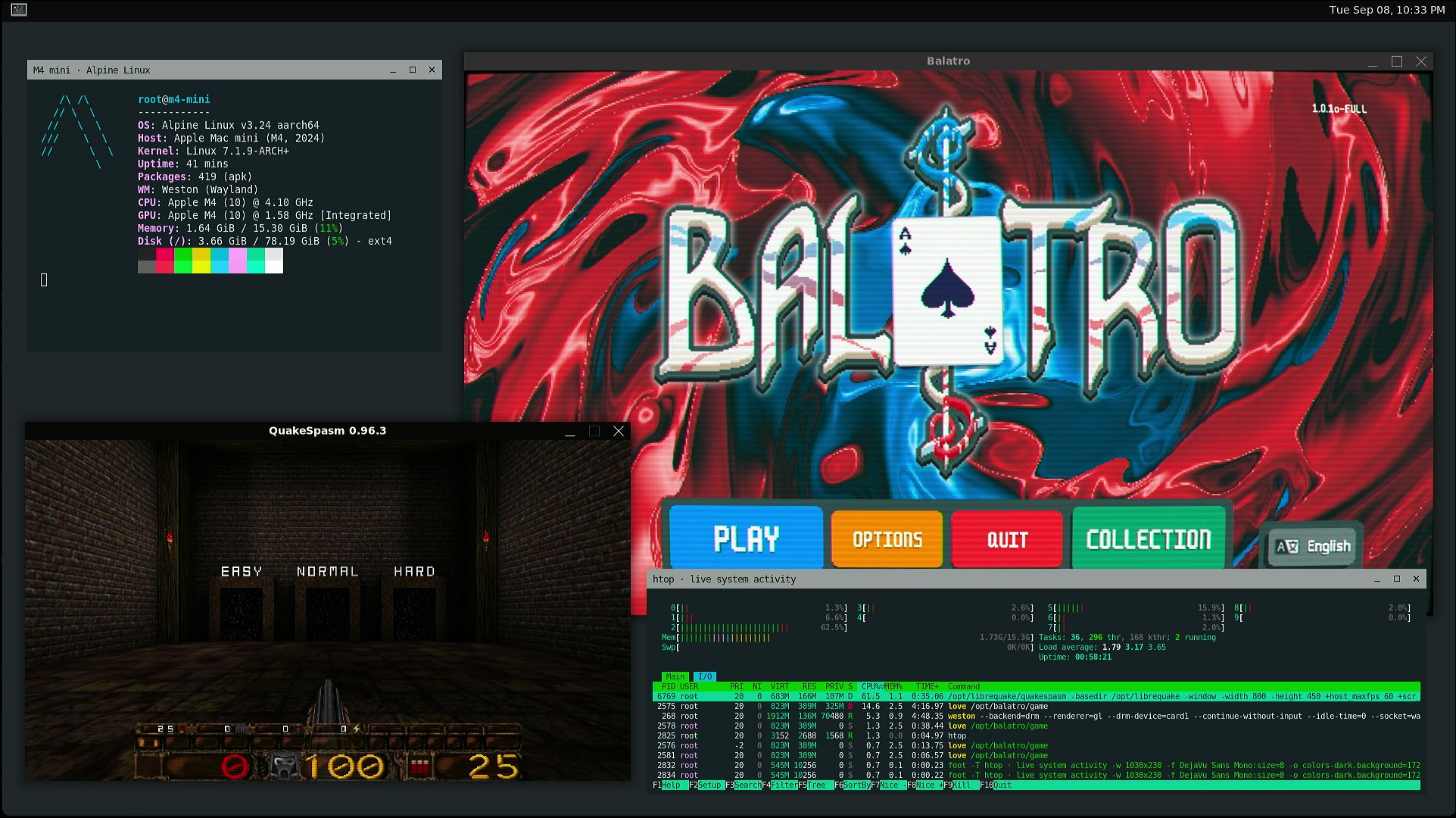
I’ll have more to say on this in the coming weeks.
Join Us and Discussion
If you’re interested in being a part of this, we invite you to join our Discord Server. Feel free to come by to discuss ideas, chat, or just hang out!
Discussion on this article:
Acknowledgements
Niklas Sheth for writing a clean room implementation of my SPTM emulator and his excellent work on the DCP and GPU
Yureka Lilian for significant help with my dev setup
The authors of Modern iOS Security Features for providing valuable insight into how SPTM works
The Asahi Linux project for laying the groundwork that made this work possible
Footnotes
My best guess is that the kernelcache has fallbacks for booting without Exclaves for DFU restore purposes. DFU restore requires booting a full kernelcache and sending all of the components over USB, but in DFU boot Exclaves are not booted (probably because they’re not necessary). Userspace has support for no Exclaves because userspace is the same in macOS images built to run under a hypervisor and in bare metal images, so it has to have fallbacks for when Exclaves are not available. ↩︎
The Modern iOS Security paper does not contain enough detail to actually implement the SPTM contract, though it was very helpful in other ways. ↩︎
There was one issue I didn’t solve, for some reason shortly after logging in (or just sitting for long enough on the lock screen) the system would freeze with the same
UNEXP_RT_HIT_DIRerror as in type 24, except there were no coprocessor page tables this time.This issue is still present on the MacBook Neo; on the M4 mac mini, Niklas fixed the issue during the development of the clean room emulator. His best guess of the root cause is that m1n1 has a WB mapping of all guest RAM, and then an access to one of the problematic pages may be speculatively executed, but we’re ultimately unsure of the root cause or why the Neo hits the problem while the M4 Mac Mini does not. ↩︎
https://github.com/ADevWithAnIdea/apple-silicon-re/blob/master/docs/sptm/exclaves.md ↩︎
A brief list: setting long timeouts then continuing to wait after they were hit (saying the guest was just slow), focusing on timing/sequencing issues when there were much more obvious logic bugs, hallucinating the function of sysregs or other Apple specific concepts. ↩︎
https://github.com/ADevWithAnIdea/m1n1/commit/ffe58c7802376b111f67b3cf45d80a1945db1f90
This prototype driver contains basically all firmware ABI details we ever need and is very comprehensive, containing full compute, render (partial renders, depth/stencil buffers, etc), fence, and multi context support. ↩︎